
How to SEO-Optimise Your Blog Content
Pay Attention to the Outline of Your Blog Content!
Pay attention to the meta data (title tag, meta description, etc.) of your blog content!
If you want to drive traffic to your website, you’ve got to have a blog section too.
Blogs that you write regularly, and come back to when you see in Google Search Console that the number of visits and impressions declined.
Then you’ve got to SEO-optimise your blog content , and start getting those visits back.
Because it’s mainly the blog or your product page that’s going to have the most visits.
There you give insights, there you show the reason why customers should trust you.
I didn’t have any second thoughts about wanting to write a blog, ever since I decided to have a website. Here I keep my readers and clients up to date with all the relevant topics about copywriting and SEO.
Search engine optimization service came later on, but copywriting is what I’m primarily doing now.
Because what would a competent English copywriter be without a proper blog?!
When we speak about blogs, let’s not just speak about purely writing them. You also need to SEO-optimise your blog content.
This blog post is about that: the way to SEO-optimise your blog content.
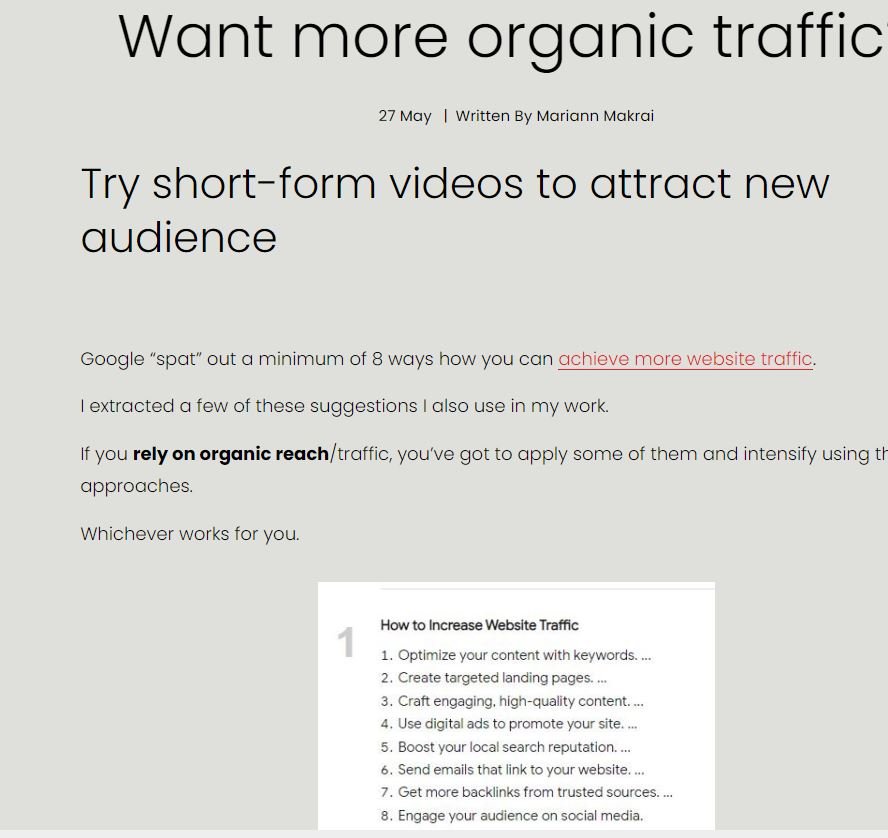
Make it stand out
Here’s a blog post on getting more organic traffic. I SEO-optimised it by improving the headline structure and adding snippets to enrich the blog content.
Who and Why Do You Want to SEO-optimise Blog Content for?
You SEO-optimise blog content, that is, make it appropriate for Google to show in the results page.
Google will show your blog content when someone searches for a particular keyword you have chosen to insert in all the relevant places inside the blog post.
At best, you will want to answer your potential customer’s query by preparing a viable blog post that will deal with their problem/issue meticulously so that they won’t have to look for another blog or website.
Very often a potential customer visits a website, but they don’t find what they need. They may not find all the answers in one place, so they turn to another content creator or agency.
And they will end up requesting their service. If they have handled the topic accordingly (that is, they answered the questions swiftly and clearly).
The better you craft that blog post in terms of content, the more probable it is that you’ll be hired or they will buy your product.
And you also want to SEO-optimise blog content for Google, because it is through Google that your potential customers are going to see what you offer.-Google now favors content that rests upon insights and experiences, the so-called E-E-A-T, not on AI.
So the more convincingly you write, and base your blog posts on your own experience and on experts’ claims belonging to the field that you cover, the more likely it is that Google will value your material and reward it with a higher position in the search results.
So, customers and Google are on the other side of your blog post. It’s they deciding how valuable your input is.
What to Look at When You Want to SEO-optimise Blog Content?
Your Blog’s Outline + Images
The Headings’ Structure of Your Blog Post
Internal and External links in the Blog Post
1. Your Blog’s Outline + Images
Of course, you must fill your blog content with images (up to 250KB size), graphics, tables, and other visual material to keep it more relevant and interesting.
Too much text without occasional images to break textual chunks is bad for readibility, so make sure to add at least one between subheadings (although I do not do that, which doesn’t mean you shouldn’t) to provide some “air” between huge blocks of text that may seem daunting.
Images relieve the eye and extend our attention span, but only if you use them to underpin ideas and lessons mentioned in the text going before it.
Tip: Use TinyPNG

Here’s a picture I designed in Canva, and added as a blog asset.
2. The Headline Structure of Your Blog Post
Now we’re dealing with SEO.
Each blog content, just as a webpage, must have 1 H 1.
It must have 1 main headline - a title conveying the main message of the content.
And that headline must have the main keyword in it.
Each headline must have 60 characters max for Google to show it in fully and recognise it. It will then display it in its search results. Anything above that number will be cut off!
So, start off with your blog posts title = H1.
Beneath it, put another, this time H2 (second in importance), and insert the same keyword in it again.
So with other H2’s distributed across the blog content where you see fit.
Each subheadline should deal with one single idea.
As mentioned earlier, break up each subheadline with an image, graph, illustration, or something similar.
What’s wrong here?
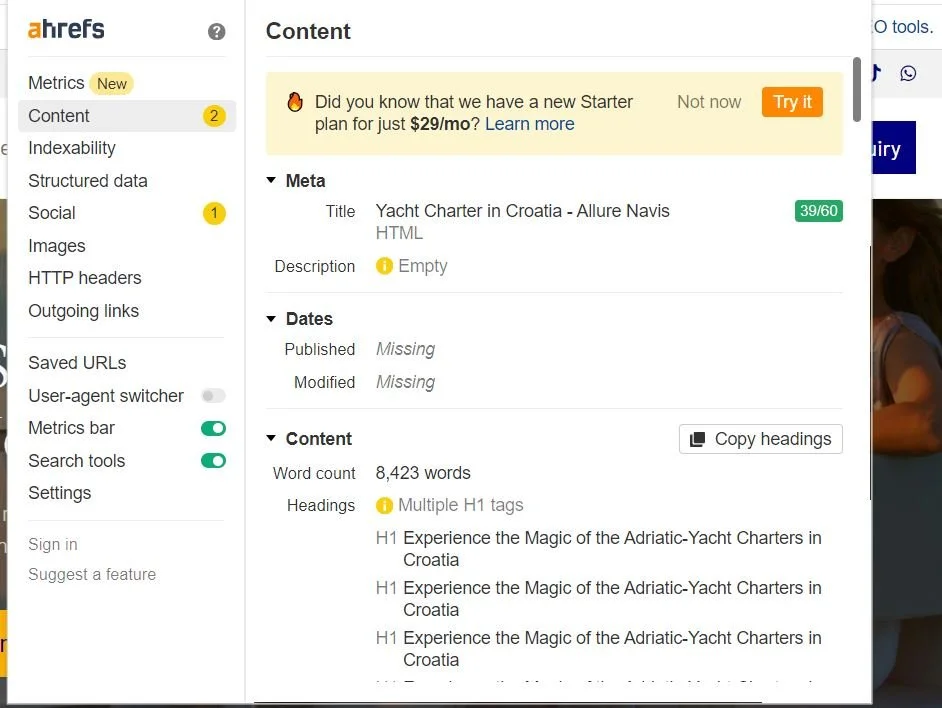
This is a snippet from Ahref, an SEO tool that displays data about your webpage. Here you can see whether the author of this page wrote this piece having SEO optimisation in mind.
the headline structure is wrong.
The webpage has no meta description (max. 160 characters with the keyword)!
this website (this is not a blog post!) has more than 1 H1.
How is Google going to categorise these titles? Which one will it give priority to. Does the author/website owner want them to have equal importance?
There can be only 1 H1 on a webpage/blog post!
All the other headlines are subordinated to that H1, following from it!
3. Internal and External Links in the Blog Post
Blog posts belong on a website, but they are not on the homepage.
You can put bits of them on your homepage and invite the readers to visit your blog section, where they will read them from beginning to end.
So, what you’ve got to do is, connect the homepage with your blog section. You’ll put a link driving visitors to a secondary page on your website.
In the same way, you must also guide readers from your blog content to other areas of your website, mostly to your homepage, service page etc..
This is called internal linking. When you link 2 URL’s that are on your website.
The quantity of the internal links enhances the strength of your website. It’s like giving it healthy food to grow. Each part of your website will communicate efficiently because you opened their doors to receive visitors, and these visitors can exit them to enter other rooms of your website.
So, the website visitors will stay longer on your website. This is called dwell time.
That’s what you also aim to achieve when you SEO-optimise your blog content or even homepage (service page etc).
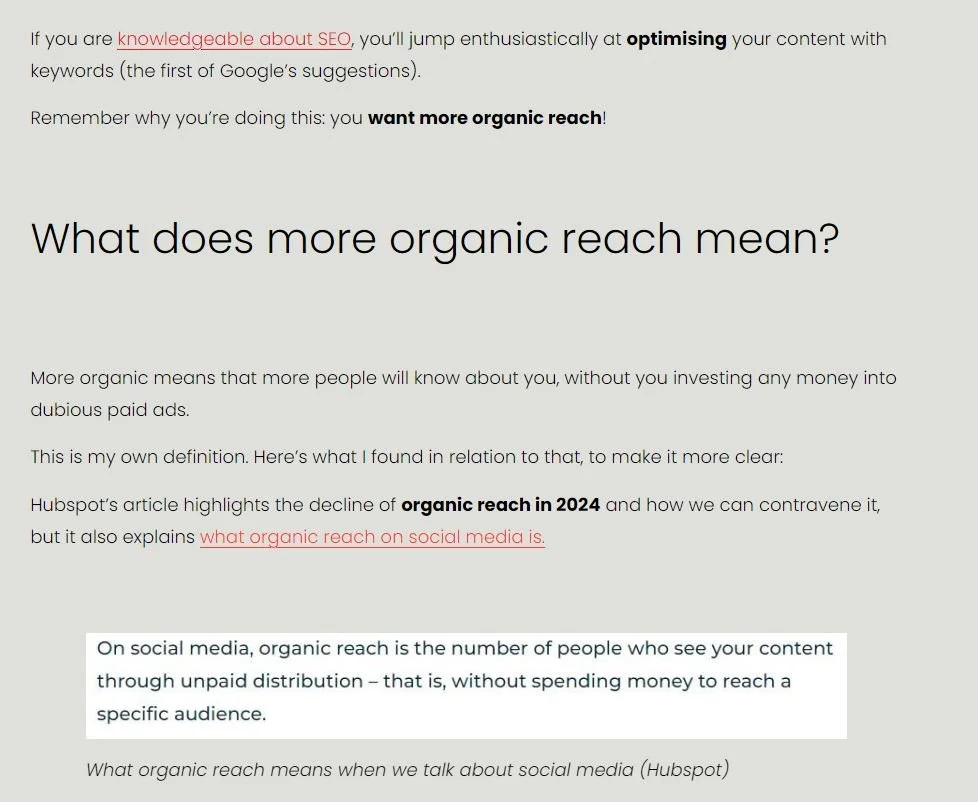
This is a blog article in my copywriting section: you can see 2 links (anchor links):
1 pointing to my homepage and
1 pointing to Hubspot (a trusted external source).
SEO-OPTIMISE YOUR BLOG CONTENT: ADD REPUTABLE EXTERNAL LINKS
See the links in red in this blog post above?
The first one points to one of my blog posts and the other to HubSpot’s site (they are knowledgeable about marketing and CRM).
They’ve also written on ways to SEO-optimise blog posts.
Use External Links of Reputable Sources to SEO-Optimise Blog Content
External links (look in the image above) help your blog content as well as other parts of your website.
By mentioning at least 1 in each blog content, you’ll give a sign to Google that your content can be trusted, because your writing rests on checked and verified sources. Not spam.
External links pointing to news portals, governmental websites, information sources that are regularly consumed every day by the majority of people only help instill trust in what you write about.
These sites have a high domain authority (DA) (they have a long history and are often consulted when people want information they can trust).
I often mention Forbes.com, Inc.com and similar sites.

This image is from Medium.com (also a website with high DA)
To summarise:
It’s very useful to have blog content. Not to mention that Google appreciates useful content, too.
Why?
Because, apart from your homepage that will most probably drive the most visits, your blog section will be often checked to see how you write (if the visitor is seeking a copywriter and an SEO professional).
See below my website stats for March 2025:
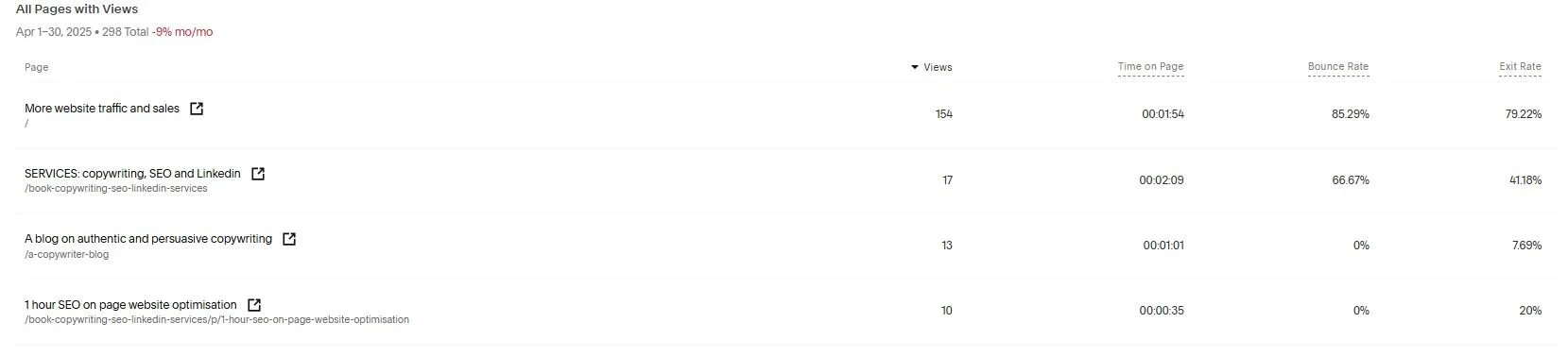
From a tool showing your website stats, these are the stats for my pages: 154 views for my homepage. The website visitors stayed more than a minute and a half on the homepage. which is great!
WEBSITE STATS