
Homepage Optimisation—What to Improve on a Homepage for More Traffic?
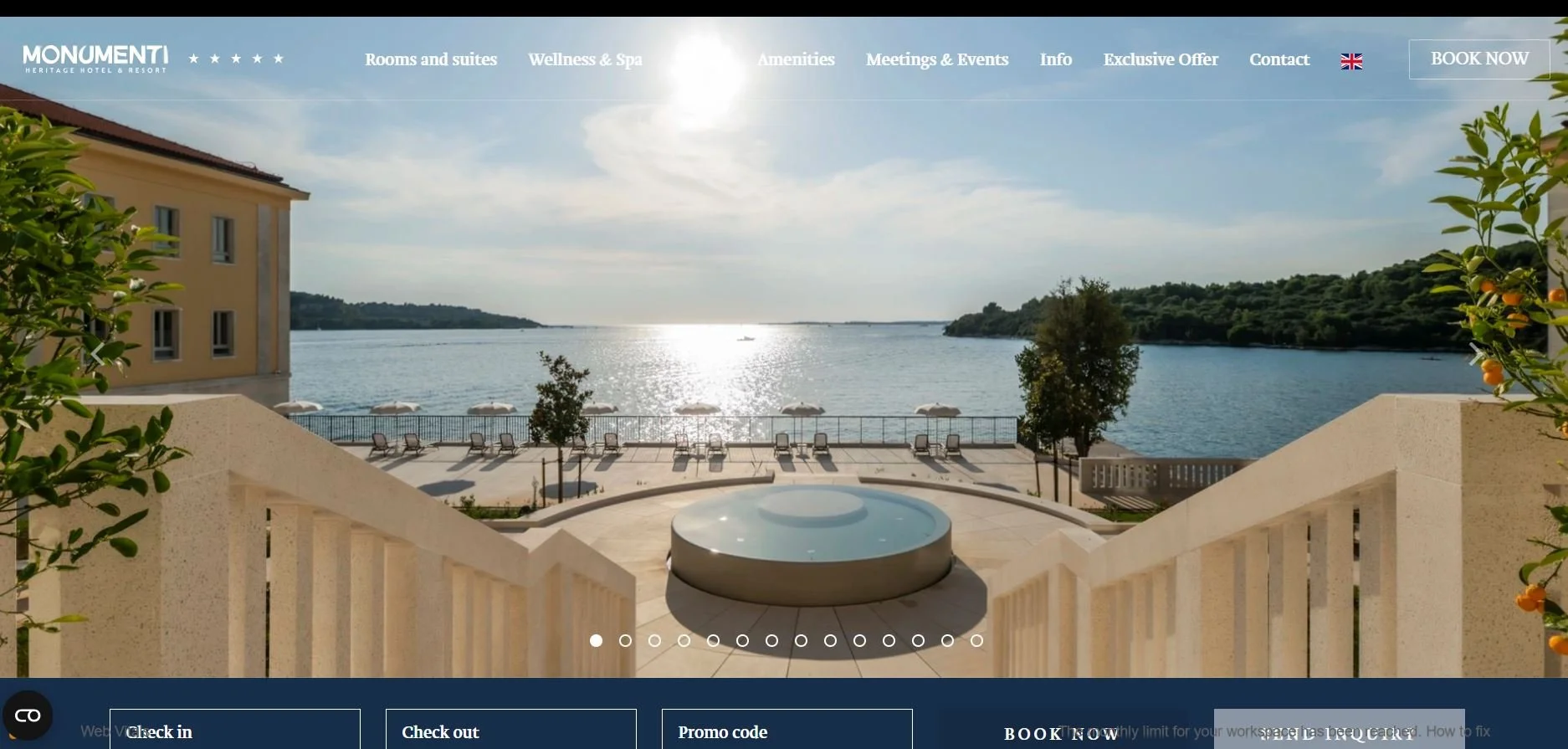
Here you see a hotel website’s homepage. What’s obvious rght aways is that there’s no heading. No text on the image. Not to greet and say Hello, but a text saying where did we arrive at, what this hotel offers, where it is etc… These are all points needed for a good homepage optimisation.
Can You SEO Optimise Your Homepage Without an SEO Strategist?
Sure, but be prepared for to find the learning materials from trusted sources.
Learning on your own is a challenge.
It takes time.
Sometimes, to get ahead quicker, it’s better to book SEO services.
And pick up where the SEO strategist made a stop - study their moves.
Even if you invest a lot of time to catch up and learn all there is about SEO and copywriting, there’ll still be something to tweak.
You’ll never be too sure that your way of SEO optimisation is the one and right way.
So, you'd like to SEO optimise your homepage, because frankly, that’s the most relevant part of your website.
Along with your service page.
So, if you’re beginning to SEO optimise on your own, interlink these two web pages.
Use an anchor link that says what visitors will find there.

1 On-Page SEO Consultation Hour - Homepage Optimisation
Optimise Your Website to Suit Search Engines
Your website is not performing well? No clients lining up for your product or service?
Book a min. of 1 hour online consultation with me and see how I can optimize your homepage or blog articles you’ve created to drive visitors to your website.
The 60 minute consultation will be on Zoom or Google Meet (whichever you prefer).
What I Need from You for Homepage Optimisation?
your web address (specify the CMS - is it Wordpress,…?) + access to your web’s backend (CMS) (optional)
how old is your website
access data to Google Search Console and Google Analytics (or you can provide me with the latest data + data from min.3 months)
the keywords you want your website (particular page) to rank for in the search engines (if you don’t know which keywords to choose or take, then this is a service for an extra fee)
do you write a blog or are you aiming to write one (you can outsource writing to me too)?
After 60 minutes, I’ll have enough data about your website and I’ll know what your ambition is regarding website traffic.
I’ll perform an audit and get back to you with a list of items you’ll need to optimize your website.
If you have a homepage with a small amount of text, then the optimization process will be much cheaper for you.
So after the consultation, you’ll need to decide if you want me to do the OPTIMISATION according to the list I provide you with.
What Does this SEO On-Page Consultation Give You?
CLARITY, you’ll be clear with how you stand with your website’s homepage regarding its efficiency in driving visitors to it
LIST TO WORK ON- you’ll get a list of items that you need to work on (optimise) so that your website appears higher on Google as a search result
AUDIT - you’ll get an SEO audit sent by e-mail after the 60 minutes consultation
The minimum fee: 85 EUR
What can you do after the SEO consultation?
If you want to do the optimization yourself, you can do it.
When you’ve done it, you can check your web’s performance with me. I can then do a new SEO audit to report back on whether you’ve done everything possible to enhance your web’s success with the search engines.
Or you can engage me to do the on-page SEO for you.
With Homepage SEO Optimisation You’ll have the Best Receptionist
I keep saying: your homepage is the reception.
It's your shop’s window.
For a customer to step inside or a guest to stay at a hotel (now we’re talking about SEO copywriting for hotels), you must also be a decoration artist.
Your window must attract!
Your doorstep must be so inviting the guest won’t think of leaving it to go to another place to buy from or stay at.
A Case - Before and After Homepage Optimisation
Let’s look at the following case.
It’s websites like these I often optimise for relevant keywords (those keywords, more of them, customers enter into Google Search, and AI tools like Perplexity, ChatGPT etc. to find the answer as quickly as possible to take the next steps - buy or book).
What was the situation before homepage optimisation?
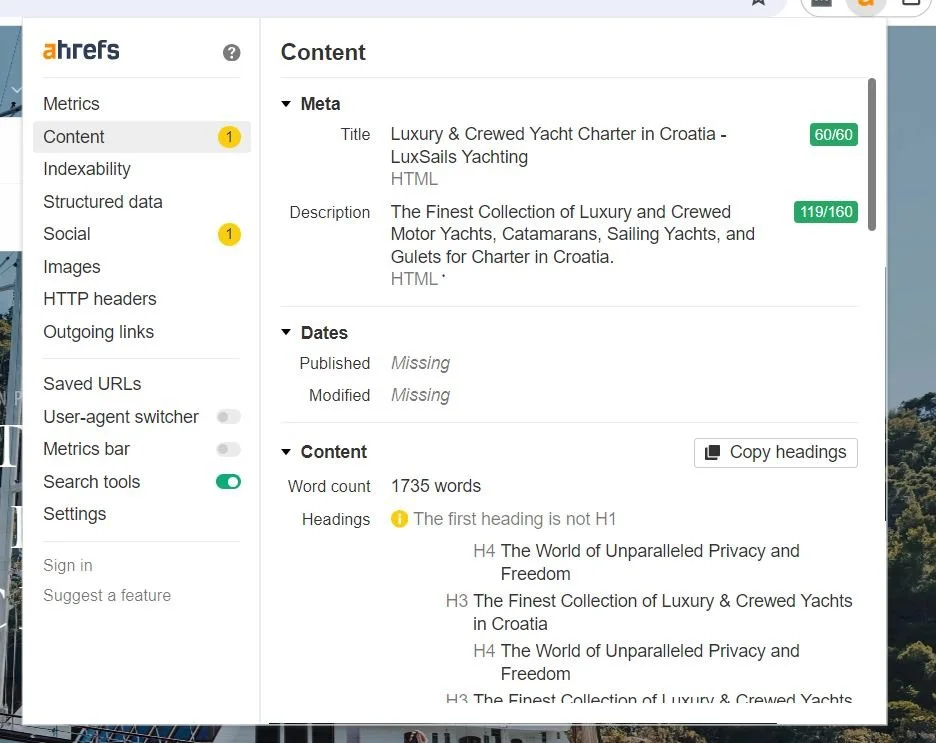
Here you see an excerpt out of Ahref’s website audit tool. You can download it and it will be always handy for you as a Chrome extension whenever you’re visiting a website.
Above you see that the client for whom I’ve been writing blog posts, but also did homepage optimisation, had some idea about how to approach optimisation without additional aid.
The client knew that there was a meta description of the page (160 characters max) and a title (60 characters max).
It doesn’t matter that much that there were more characters in each than allowed; the most important thing is that the keyword was inside those descriptions.
What’s Very Often the Issue before the Requested Homepage Optimisation?
It’s the headline structure or the headline naming that often is the stumbling block for search engines like Google.
The problem above was in the heading on the homepage (in the picture it’s under “content” inside the Ahrefs).
There was no H1 !
No heading 1, which determines the main subject of the page.
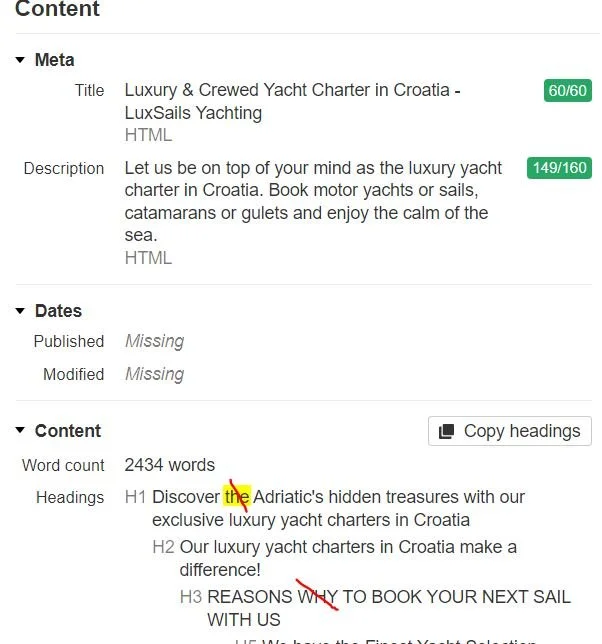
Here I’ve added H1, which I then corrected.
I used AHREFS to see how the client named each section on the homepage.
If you decide to go on your own with homepage optimisation, calculate at least 1 month of not-so-rigid learning, taking in all you can from different online tutorials and free webinars.
On-page SEO optimisation is not difficult.
I’m saying on-page, because we’re dealing with elements that you see on the webpage (homepage), and not code.
What On-Page SEO Homepage Optimisation Really Means
On-page homepage optimisation means getting all relevant items on a homepage right.
This involves text and images, meta titles, title tags etc. It doesn’t mean technical SEO, which is off-page.
Off-page SEO means fixing website issues that are hidden from sight (website loading speed etc.)
Steps for homepage optimisation
insert headings in your content - headings and the title help Google understand your content
Make H1 the most important headling (headline). Insert the relevant keyword in there.
Headings after homepage optimisation (below)
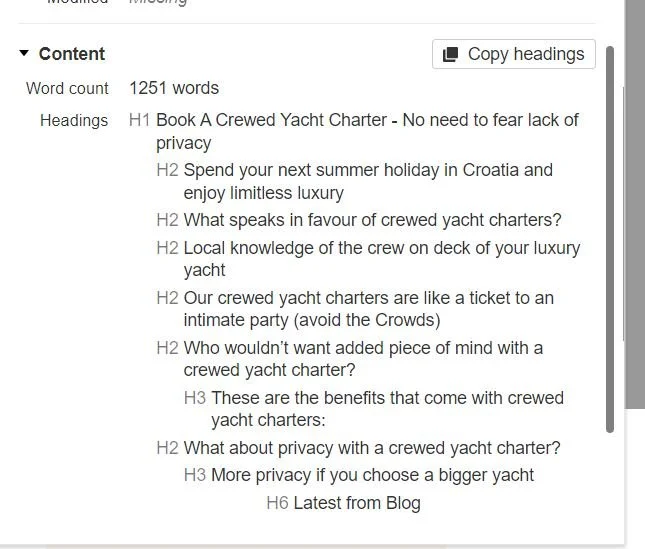
This is how headings look after I took the project
Write out your content and divide it into sections to fit under headlines that mention the main keyword.
A heading must be of definite length. Optimally, headings should have less than 11 words and a maximum of 60 characters. Just like titles.
The text under each heading should not be more than 5 sentences long, copy experts say, though I tend to write longer blocks of text.
It’s important that the content expands the idea that is touched upon in the heading.
An example:
Book a crewed yacht charter - No need to fear lack of privacy (H1)
12 words (too much actually) + 60 characters (with spaces) (keyword is a long-tail keyword consisting of 3 words)
describe all the images you put in the text (alt text)
Visuals that accompany the text should all be named properly (no number or letter combinations that have no meaning, and add a hyphen between the words).
You must add the title and a short description of your image containing the keyword you want to rank for on Google and other search engines.
add other media content (not just images), and don’t forget to describe them so that the descriptions have the relevant keywords identified earlier, before crafting website copy
Media like illustrations, graphs, videos etc.
Adding a variety of media can be crucial for overtaking competitors who rank with the same keyword, but lack different media cotent.
always have a CTA (a call to action button, saying what visitors should do after they read the text)
The CTA should point to a separate page on your website, where visitors can either fill something in or learn more about the service you provide.
It’s recommended to have several CTAs. When possible, after each rounded section of text, where you invite your website visitors to take an action.
I’ll put a CTA right here and invite you to look at how I perform homepage optimisation: the headings on the homepage.
It can useful to read this guide for homepage optimisation (it’s fresh, valid for 2026) .
I’m showing how to change headings on my Squarespace website. Sometimes changing a heading can lead to more website traffic. If you craft a heading that’s appealing and that invites potential customers to click on your website in the serach results.